

The release notes provide information on the features and improvements in the specified version. The release dates that are related to the version of the release are published in the Curriculum/Workload Management release schedule.
Improvements
The issues in release mentioned under the section improvements are considered as new functionality, user experience improvements or bug fixes. Issues marked as Hotfix have been developed during this Sprint release, but are hotfixed and technically added to the previous release or direct to production based on the impact of the issue.
Fields of type number should not offer 'undesired assistance' - CUR-2387
The number field offers an 'up and down arrow' as assistance, to allow using the mouse or up and down arrows to enable stepping one up or down. This was working so good that in case a value was typed it was very easy to change the value when moving away or scrolling away, causing the value to be changed.
A change is applied to handle to focus to the or 'mouse-over arrows' and prevent from accidental changing the value when moving away or scrolling the page.
As a user I want a clear option to de-select a value - CUR-2387
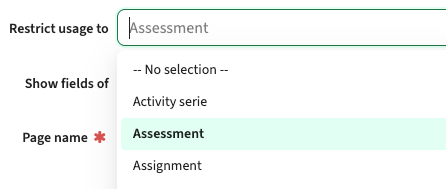
Based on standard guidelines the de-select of a value in a list-box was recently changed from an 'empty selection' to a stylish x in the select box. Based on the reactions we learned that stylish is not always the most understandable solution for implementation consultants and users. We reverted the change and added the 'No selection' option to the listbox to de-select a earlier selected value.
Information set to be shown on the method-scheme should be shown - CUR-2464
When marking a field to be shown at method level in the method-scheme, the information was not shown. At the end the issue was not that the information was no shown, but that more than 2 values were defined to be shown. The display limited the display to two additional columns (values), to keep the screen as calm as possible.
A change is made to increase this limit to a maximum of four additional values to be shown. The expectation is that the administrator doing the configuration will validate based on the type / values of the additional added fields will validate if four will fit and still keep a readable page.
The label and related value should be aligned - CUR-2446, CUR-2345
It was noted due to some generic UI changes applied the alignment between the label and its corresponding value was off in case the information was shown read-only. The effect was visible for individual fields or pages marked as read-only or the label page (which is always read-only). This has been fixed, so the label and its corresponding value are properly aligned.
Topbar related findings and improvements - CUR-2454, CUR-2404
The release of the topbar to the acceptance environment has lead to a number of findings that are solved in this release:
- As a user you should only see the accessible menu items in the Personal menu, instead of all
- The selected menu options should be highlighted, so the user will immediately see what menu has been selected
The footer information should be moved to the topbar - CUR-2444
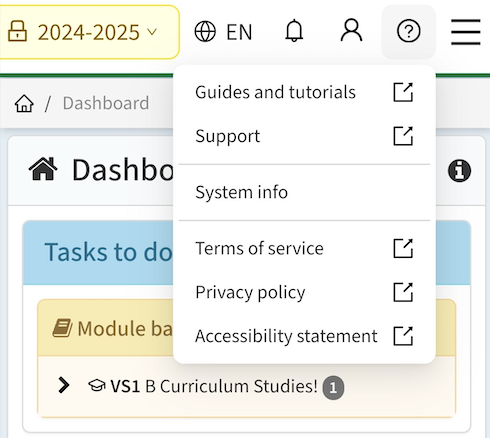
The footer is removed and the information accessible in the footer has been moved to the topbar. The topbar will show a (?) (question mark icon) at the right, that unfolds when clicked. The information accessible is the information that was defined in the footer.
Configuration
As part of the change applied the label identifiers used will be changed, and a new one is defined:
- Navigation.Help.Docs.Url (renamed label for Static.Label.Manual.Url), used to define the URL to the documentation.
- Navigation.Help.Support.Url (new label), used to define the URL to the internal support info (FAQ) or support desk.
When adding an existing group, filtering should be able - CUR-2360
When adding a module-group to the study structure, the filter option supporting filtering on attributes such as module-group type or faculty didn't work (anymore). The filter could be applied, but the results were not filtered. This has been fixed, so filtering is working again.
The activity-list should support display of all activity defined fields - CUR-2489
When defining the fields to be shown in the activity-list, the select box offering the available fields to select from only showed a limited set of fields. This has been fixed, so the select box of fields to be shown is showing all defined fields.
Integration
The issues mentioned under the section integration are considered as extension, improvements or bug fixes related to the Curriculum API, OOAPI and/or CSV import functionality.
The API support for expressions should be more forgiving - CUR-2430
The API Get endpoints provide the option to specify an expression to restrict the returned results, e.g. typeId in ('BA', 'MA') on the study endpoint to only retrieve studies of type Bachelor or Master. The definition of the filter was very strict, like using the correct casing. Some changes have been applied to be more forgiving using different casing and spacing.
Security
An integral part of our development and build process is automatic scanning for known security vulnerabilities. The vulnerabilities will be fixed based on their impact, which means that in some cases an immediate hot-fix will be applied, and in other cases the vulnerability will be fixed in the current or next Sprint (release). The security section provides an overview of the vulnerabilities mitigated. For more information on reported vulnerabilities, see the central database of vulnerabilities.
Person information should only be accessible and editable for the admin - CUR-2453, CUR-2461 (Hotfix)
Due to a change applied earlier, for a normal user it was possible by manually entering the URL to get access to the personal information. This has been corrected, so unauthorised users will not have access and will get a proper message stating this.
Refer to the Workload Management manual for configuration guidance.