

The release notes provide information on the features and improvements in the specified version. The release dates that are related to the version of the release are published in the Curriculum/Workload Management release schedule.
Improvements
The issues in release mentioned under the section improvements are considered as new functionality, user experience improvements or bug fixes. Issues marked as Hotfix have been developed during this Sprint release, but are hotfixed and technically added to the previous release or direct to production based on the impact of the issue.
Using a formula hook to update specification fields should work - CUR-2703 (Hotfix)
The formula hook can be used for bulk change of information, e.g. codes, based on a formula. Then applying this hook with a formula including the academic year on a specification, this fails. This has been fixed by enabling the usage of the academic year in code generation for specifications.
This might be a rare case, since specifications is a 'non-year' dependant object, where only the additional information is considered year specific.
As a user I should be able to create a new simulation - CUR-3245 (Hotfix)
Creating a new simulation did not work. The cause is found and fixed. Users are able to create new simulations again.
Side-by-side display of descriptions should work properly - CUR-2628
The side-by-side (sideways) option managing descriptions should show the multiple languages next to each other. It was noted that based on screen width and/or browser the boxes were not properly positioned. This has been fixed, and the boxes are positioned correctly side-by-side,
As a user I should be able to logout - CUR-2661 (Hotfix)
When logging out of Curriculum, the user session was not properly destroyed. This meant the users logged out, got information logout was successful. But when the curriculum URL was entered, the user was still logged in. This prevented users having multiple logins to easily switch between accounts.
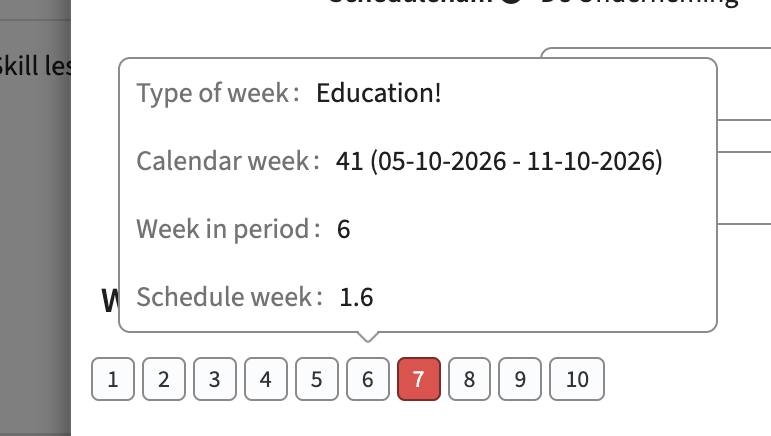
The teaching weeks display should respect the configuration - CUR-2679 (Hotfix)
The configuration parameter schedule.display_week with parameter options period / calendar / schedule, is not respected in displaying the schedule weeks. This has been fixed, so the correct week will be shown.
Next to the fix, an UI addition has been applied to support mouse-over showing additional information for the user.
Reports showing the calculated contact hours should show the correct value - CUR-2577 (Hotfix)
When having a page showing both the management of the contact hours and the report of the contact hours it was noted the information was not correct. It seemed the reported information was incorrect.
The issue however had a different cause. The shown information on the edit part was performing the new calculation and showing the result. The information should be saved, but was not properly saved. This caused the mismatch, where based on actually stored data the report was correct. The issue on save has been fixed and for customers affected the recalculation of the values, including saving them has been executed.
Person related tabs should not be named workflow - CUR-3229 (Hotfix)
In the previous release an issue was introduced that caused Person tabs to use the incorrect label, and therefor showing Workflow. This has been fixed, so the proper label is used.
Topbar message should be shown - CUR-2714 (Hotfix)
The topbar message was no longer shown. This has been fixed.
Next to that the title of the news message, used as topbar message, is shown instead of only the text.
The configured display type should be respected - CUR-2716
In case the display type vertical checkboxes was configured for list values (element, references), the display was horizontal. This has been fixed, so both horizontal and vertical checkboxes are showing the selectable options in the expected manner.
The configuration of tab sequence should be respected - CUR-2702
In the previous release a new functionality was added where the tab sequence for new or existing objects could be configured. This worked correctly in the structure page for managing module-groups, but didn't work for managing modules. A fix is applied that will use the defined sequence for both module-groups and modules.
A new module-group created on the structure page should be shown immediately - CUR-2945 (Hotfix)
When adding a new module-group on the structure page, the module-group was created and saved, but not shown on the screen. Only after refreshing the page the module-group was shown. This has been fixed, and the created module-group is shown in the structure directly after create.
Using a select list exceeding 250 items should search in the entire list - CUR-3233
There has been a first solution implemented to support lists exceeding > 250 items. This was not working in all cases and was not offering an intuitive option. A change has been applied to make it more intuitive:
- Inform the user to Search for a value (there will be no full list in a dropdown, search is required)
- Extend the shown search results to not only show the first 5, but show up to 250 items found
Configuration:
Set the value display type to autocomplete for select lists exceeding 250 items
It should be possible for a user to edit the availability - CUR-3235 (Hotfix)
A user, even having the correct authorisation (EDIT_AVAILABILITY_PREFERENCE or EDIT_AVAILABILITY_PREFERENCE_WORKFLOW), was not allowed to change its availability. This was caused by an incorrect interpretation of the 'read-only' setting. This has been fixed, and the users can again edit their availability.
Ad-hoc offerings should respect the field configuration - CUR-2627
When adding a new ad hoc offering the conditions on the offering fields were respected. When editing an existing ad hoc offering the conditions on the offering fields were not respected. A fix is applied, and both the create and edit will respect the field configuration.
Contact hours should be displayable at the method-tree - CUR-2934
When defining the fields to be shown in the method-tree, the 'contactHours' field were only selectable when the 'Show fields of' was set to 'Method'. A fix is applied to allow selection of contactHours without setting 'show fields', since both the method-tree and the contactHours are implicitly bound to a method.
Unsaved changes window should only appear once and not 'random' - CUR-2662
In some cases it happened the 'Do you want to save your changes' window popup up multiple times, feeling like a more random action. The cause is found and fixed, so the changes window should only pop-up when expected / needed again.
It should be possible to show/hide add and delete on the structure page using configuration - CUR-2710
The behaviour of the structure page showing add and delete is bound to the authorisation of a user. But not in all cases a structure page should be offered based on the authorisation. In some cases the requirement is to only show the Add or the Delete button.
A change has been made to the configuration option of the structure template, supporting the management of the Add and Delete button using configuration. This allows steering the display of the Add and Delete button. The option will overwrite the display of the button in case the user has the rights to see/use them.
Configuration
- Set the setting 'Hide Add' to not show the Add option
- Set the setting 'Hide Delete' to not show the Delete option
Search on ( should not throw an error - CUR-3248
The search function generated an error in case the search term contained a (. This has been fixed, and no error will be thrown, but the ( will be used in the search.
FTE should be shown on the person general page - CUR-2619
The general page information for a person is extended with the display of the FTE.
Integration
The issues mentioned under the section integration are considered as extension, improvements or bug fixes related to the Curriculum API, OOAPI and/or CSV import functionality.
The API should support update of module-group type - CUR-2711
When creating or updating module-groups using the module-group endpoint, the type provided was not saved. This as been fixed, and the API will enable setting / updating the module-group type using the API.
Security
An integral part of our development and build process is automatic scanning for known security vulnerabilities. The vulnerabilities will be fixed based on their impact, which means that in some cases an immediate hot-fix will be applied, and in other cases the vulnerability will be fixed in the current or next Sprint (release). The security section provides an overview of the vulnerabilities mitigated. For more information on reported vulnerabilities, see the central database of vulnerabilities.
Fixed Security Issues - CUR-3232
Resolved vulnerabilities in third-party libraries:
- CVE-2025-61795(5.3)
As an unauthorised user I should not see the Take-over option - CUR-3249
The validation of the authorisation to execute process management functions was not working correctly on the detail screen of an individual object (module, study, ...). This has been fixed, and the authorisation is respected not only in the overall process manager, but also in the individual object process management.
Refer to the Curriculum manual for configuration guidance.