

The release notes provide information on the features and improvements in the specified version. The release dates that are related to the version of the release are published in the Study guide release schedule.
Improvements
The issues in release mentioned under the section improvements are considered as new functionality, user experience improvements or bug fixes. Issues marked as hotfix are developed in this sprint but applied to the previous release or directly to production, depending on impact.
List and Table settings should be respected in search results - SG-555
The behaviour of the main tab showing the list of results can be configured to either use the list or table view. In case the list was defined as the default behaviour it started as table. This has been fixed, and the defined default behaviour is respected.
Next to that if a user toggles their view, the selected display behaviour is stored for the selected page, instead of global for all search result pages.
How to handle Disclaimer, Privacy and other footer links - SG-557
We regularly get questions / remarks that the footer links navigate to the study guide landing page. This was the default behaviour in case no configuration of the desired URL was defined.
This has been changed, and now the footer links will no longer be shown if the URL configuration is set to - (minus).
The footer links are 'labels' and can be configured with the correct URL by the administrator.
- FOOTER.FOOTER.COOKIES.URL
- FOOTER.FOOTER.COPYRIGHT.URL
- FOOTER.FOOTER.DISCLAIMER.URL
- FOOTER.FOOTER.PRIVACY.URL
Expired groups and modules should not be shown - SG-553
Module groups and modules that were rolled over to the next year and after the roll over were given an end data that lies before the start of the year, were still shown in the study structure.
A fix is applied that validates on end data. If the end date of the module or module group is before the start date of the year the module or module-group will be excluded.
The study guide should be configurable to be excluded from search engines - SG-558
A configurable option is added to exclude the study guide from being indexed and searchable via search engines.
This will be done by setting a header on all the pages: <meta name="robots" content="noindex,follow" />
Configuration:
- Set the parameter analytics.disabled to true
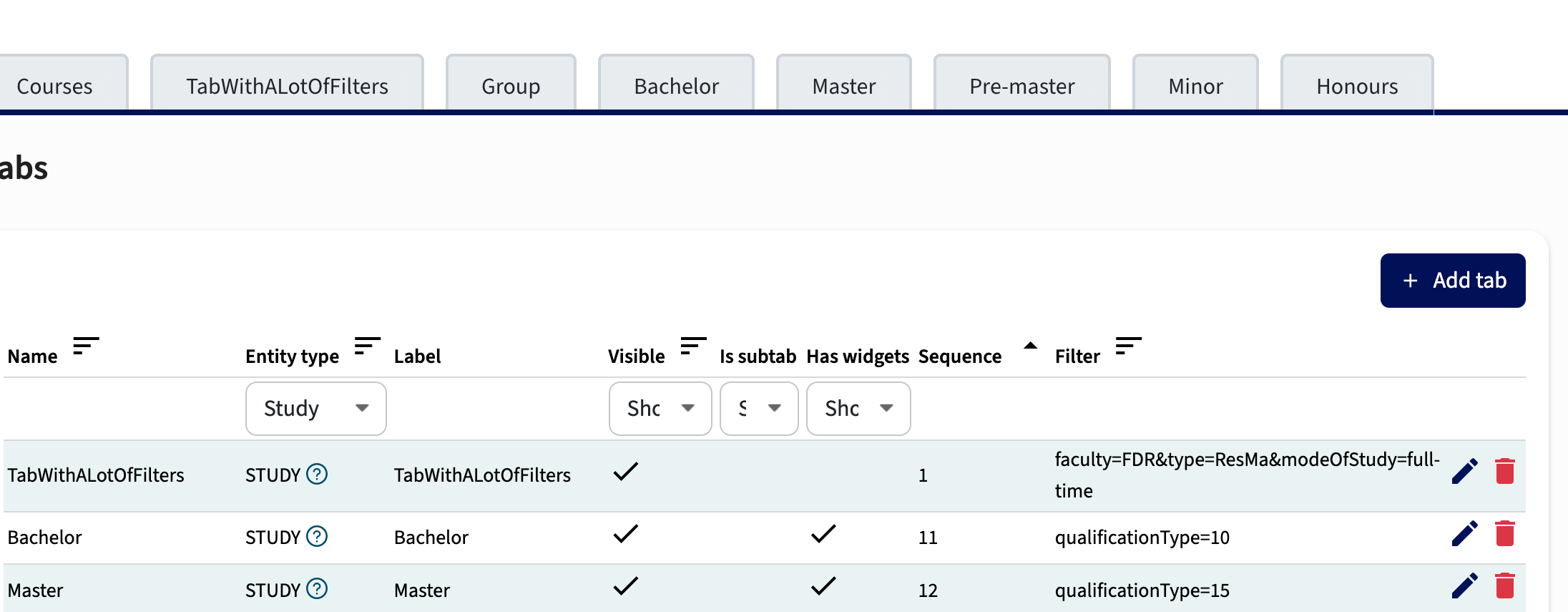
The Tab filter should support more complex options - SG-549
The Tab filters only supported simple filtering, e.g. type=BA or type in (BA,MA). The support for filters is extended with support for more complex filter options using and operators.
Configuration
The configuration is 'URL style' where the AND is replaced by an &, for example:
- faculty=FDR&type=BA&modeOfStudy=part-time
Will select all part-time Bachelor studies of the FDR faculty
For direct linking the verb mainTab has been added and can be used in the URL:
- https://<myStudyGuideURL>/studies?mainTab=<myTab>&modeOfStudy=part-time&faculty=ART
Will open the defined tab and show all part-time studies for the ART faculty
Improve UX compliancy for tooltips - SG-560
To improve readability the exclamation icon has been replaced by the question mark icon.
Security
An integral part of our development and build process is automatic scanning for known security vulnerabilities. The vulnerabilities will be fixed based on their impact, which means that in some cases an immediate hot-fix will be applied, and in other cases the vulnerability will be fixed in the current or next Sprint (release). The security section provides an overview of the vulnerabilities mitigated.
For more information on reported vulnerabilities, see the central database of vulnerabilities.
Fixed Security Issues - SG-556
Resolved vulnerabilities in third-party libraries:
- CVE-2026-22029 (8.0)
- CVE-2026-25639 (7.5)
- CVE-2025-15284 (8.7)
- CVE-2025-13465 (6.9)
- CVE-2025-66400 (6.9)
- CVE-2025-68470 (6.5)
- CVE-2026-24001 (5.3)
- CVE-2026-2391 (3.7)
- CVE-2025-68458 (3.7)
- CVE-2025-68157 (3.7)
For more guidance on configuration and setup of Study Guide, use the relevant Study Guide manual.